
Mastering Your Integration List: Strategies to Connect Siloed Data
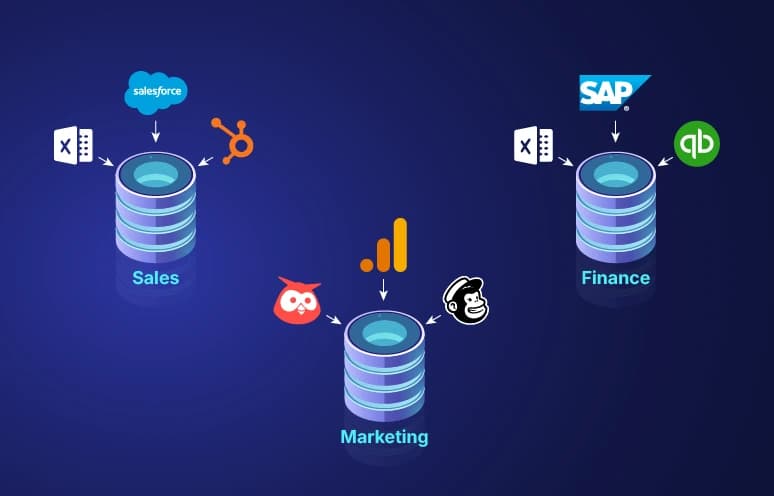
A robust integration strategy is the roadmap for how your different software systems talk to each other. Without it, your expensive tools are just isolated islands generating data that never connects, never compounds, and never delivers the insights you paid for.
The Problem of Data Silos
Your marketing team uses HubSpot, your sales team uses Salesforce, and your finance team uses QuickBooks. If these systems do not integrate, you have no way of knowing how a marketing campaign directly impacts revenue without hours of manual spreadsheet work. And manual spreadsheet work introduces errors, creates version control chaos, and produces reports that are outdated the moment they are finished.
Data silos are not just an inconvenience, they are a strategic liability. When leadership cannot see a unified picture of the business, decisions are made on incomplete information. Budgets get allocated based on gut feeling rather than evidence. Customer experiences suffer because support teams cannot see the same history that sales sees. Data integration eliminates these silos by creating defined, automated pathways between systems.
Building Your Integration List
When planning a data integration project, the first step is to create a comprehensive integration list. This is a structured audit of every system in your environment and how data flows between them. A thorough integration list documents:
- Source Systems: Every place data originates, from transactional databases and SaaS platforms to file shares, spreadsheets, and third-party feeds.
- Data Types: Structured data (SQL tables, CSV exports) versus unstructured data (emails, documents, PDFs, images).
- Frequency: Whether each integration needs to run in real time, hourly, or as a nightly batch process.
- Method: Whether data moves via REST API, SFTP file transfer, direct database connection, or a webhook.
- Ownership: Which team or person is responsible for each integration's health and maintenance.
- Dependencies: Which integrations must run before others can start, for example, payroll calculations that depend on hours data from the time-tracking system.
ETL vs. ELT Strategies
Traditionally, businesses used ETL (Extract, Transform, Load) to clean and reshape data before storing it in a warehouse. This approach works well when storage is expensive and raw data is messy enough to cause problems downstream if loaded as-is.
Today, modern cloud data warehouses like Snowflake, BigQuery, and Redshift allow for ELT (Extract, Load, Transform), where raw data is loaded immediately into the warehouse and transformed afterward using SQL or dbt. This approach is faster, more flexible, and ensures no raw data is lost during premature transformations. If your transformation logic needs to change, you can re-run it against the original data without re-extracting from the source system.
Common Integration Patterns
Point-to-point integration directly connects two systems. It is simple to build but becomes unmanageable as the number of systems grows, with 10 systems, you potentially need 45 direct connections. A hub-and-spoke model routes all data through a central integration platform, reducing complexity significantly. Event-driven integration uses a message broker like Apache Kafka or RabbitMQ to decouple systems so they communicate asynchronously without blocking each other.
API-First Integration
Most modern SaaS platforms expose REST APIs for data access. Building integrations against well-documented APIs is preferable to database-level connections because APIs are version-controlled, access-controlled, and maintained by the vendor. When a SaaS vendor updates their database schema internally, your API integration continues to work as long as the API contract does not change.
When selecting SaaS tools, prioritize vendors with mature, well-documented APIs and pre-built connectors for common integration platforms like Zapier, Make, or native connectors in your data pipeline tool.
Real-Time vs. Batch Integration
Not all integrations need to run in real time. Financial reporting can tolerate nightly batch runs. Inventory snapshots can sync hourly. But customer-facing operations, like a support agent needing the latest order status, may require near-real-time data that is seconds old at most. Choosing the right frequency for each integration reduces infrastructure costs while meeting the actual business requirement.
Data Governance in Integration Projects
Integration projects frequently expose data governance gaps. When you try to join customer records from the CRM with order records from the ERP, you discover that each system uses a different customer ID format. This is a governance problem, not a technical one. Successful integration requires agreeing on master data standards, canonical IDs, date formats, field names, before any code is written.
Common Integration Mistakes
The most common mistakes include building integrations without error handling (so when an API returns a 500 error, data silently disappears), hardcoding credentials in integration code (a security risk that breaks integrations when passwords rotate), failing to monitor integration health (so a broken pipeline goes undetected for days), and treating integration as a one-time project rather than infrastructure that needs ongoing maintenance.
Ready to connect your business systems?
Hawkeye Core designs and implements data integration pipelines for Houston businesses, connecting CRMs, ERPs, billing platforms, and custom applications into a unified, reliable data environment.
Talk to an expert