
Scheduling Dispatch - TaskmeToday
The Complete Job Scheduling & Field Inspection Solution for Modern Teams
A comprehensive job management platform that combines smart scheduling, field operations, and digital inspections. Whether you manage construction teams, field services, quality control, or project-based operations, this tool streamlines everything from job assignment to final reporting.
Simple, Transparent Pricing
PROFESSIONAL
Most popular for growing businesses
What is Scheduling Dispatch?
Scheduling Dispatch is a comprehensive job management platform that combines smart scheduling, field operations, and digital inspections in one powerful system. Whether you manage construction teams, field services, quality control, or project-based operations, this tool streamlines everything from job assignment to final reporting, all accessible from your website, desktop, or mobile device.
See It In Action
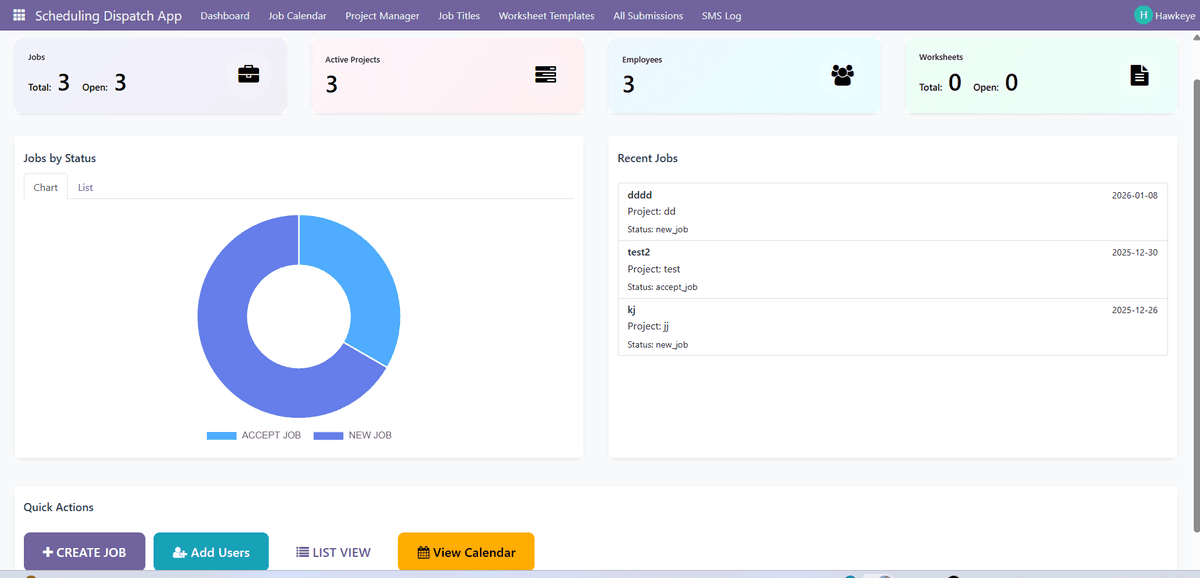
Dashboard screenshot showing the complete interface
Core Features
Smart Dashboard & Real-Time Analytics
Real-Time KPI Metrics - Track total jobs, open jobs, active projects, employees, and worksheets
Visual Analytics - Interactive charts showing job distribution by status
Role-Based Views - Dashboard adapts for managers, employees, and customers
Recent Activity Stream - See latest jobs and updates instantly
Quick Action Center - One-click access to create jobs and view calendar
Modern Gradient UI - Professional, colorful design with smooth animations
Quick Job Assignments
Fast Job Creation - Simple form with all necessary details
Smart User Assignment - Assign based on skills and availability
Customer Management - Link jobs to customers with contact information
Priority Levels - Set job priorities to keep teams focused
Bulk Operations - Create and assign multiple jobs at once
Live Tracking & Updates
Status Tracking - Track jobs through multiple workflow stages
Progress Monitoring - See which jobs are active, pending, or completed
Color-Coded Indicators - Visual status colors identify states instantly
Activity Logs - Complete history of all job actions and changes
Real-Time Dashboard Updates - Data refreshes automatically
Automated SMS Notifications
Job Assignment Alerts - Employees get SMS when assigned new jobs
Timezone-Aware Messages - Notifications display in local timezone
Custom Message Templates - Include job title, start date, and location
SMS Status Tracking - Monitor sent/failed messages
Error Handling - Automatic retry for reliability
Easy Calendar View
Multi-View Calendar - Day, week, month, and agenda views
Color-Coded Jobs - Status-based colors for easy scanning
Drag & Drop Scheduling - Move jobs to different dates and times
Quick Job Details - Click events to see full information
Filter Options - View by employee, project, customer, or status
Project Monitor & Grouping
Project-Level Dashboard - See all jobs grouped by project
Active Project Tracking - Monitor projects in progress
Project Progress - View completion rates and pending work
Job-to-Project Linking - Assign jobs to projects for organization
Project Reports - Generate summaries of work per project
Digital Inspection Forms & Worksheets
Template-Based Forms - Industry-specific inspection forms
Dynamic Form Builder - Create custom worksheets tailored to needs
E-Signature Integration - Collect legally binding signatures
Multi-Level Approvals - Route worksheets through approval chain
Professional PDF Reports - Polished, custom-branded reports
Auto-Save to Attachments - Forms automatically attach to jobs
Photo Documentation - Add photos and supporting documents
Location Tracking - GPS coordinates captured with submission
Offline Capability - Work without internet, sync when connected
Customer & Job History
Complete Job Archives - Access all historical job data
Customer Job History - View all jobs completed for each customer
Performance Tracking - Monitor completion rates and metrics
Search & Filter - Find any job quickly by date, customer, or employee
Export Capabilities - Download job data for external analysis
Multi-Level Access Control
Three User Roles - Manager, Employee, and Customer access levels
Role-Based Permissions - Each role has specific capabilities
Record-Level Security - Users only see authorized data
Custom Permission Rules - Fine-tune access for teams
Audit Trail - Track all user actions and changes
Google Maps Integration
Interactive Job Maps - See job locations on Google Maps
One-Click Navigation - Open directions in Google Maps
Address Geocoding - Automatic conversion of addresses
Location Visualization - See where all jobs are happening
Route Planning - Plan efficient routes between job sites
Mobile-Friendly Access
Responsive Design - Works perfectly on any device
Touch-Optimized - Easy to use with touch interfaces
Mobile Dashboard - All KPIs accessible on mobile
Field-Ready Forms - Fill out inspections on-site
Photo Capture - Take photos from mobile camera
No App Required - Access through web browser
Document Management
File Uploads - Attach documents and photos to jobs
Attachment Library - Files organized by job for easy access
Photo Management - Store before/after photos with jobs
File Previews - View attachments without downloading
Bulk Downloads - Download all job attachments at once
Perfect For These Industries
Construction & Contracting
Field Services
Quality Control & Testing
Engineering & Inspection
Property Management
Landscaping & Outdoor Services
Delivery & Logistics
Why Businesses Love Scheduling Dispatch
Saves Time
No more back-and-forth calls, paper forms, or manual tracking. Create jobs in seconds, assign them instantly, and track progress in real-time.
Boosts Productivity
Assign tasks faster, keep teams on schedule with SMS alerts, and complete more jobs per day. Employees spend less time on paperwork.
Improves Customer Service
Faster response times, professional PDF reports, better organization, and real-time updates mean happier customers.
Reduces Errors
No missed jobs or scheduling mix-ups. Digital forms with e-signatures eliminate lost paperwork. Lock/unlock controls prevent unauthorized changes.
Ensures Compliance
Digital signatures, form locking, approval workflows, and complete audit trails ensure documentation meets industry standards.
Better Documentation
Professional PDF reports with your branding, photo attachments, GPS stamps, and automatic filing.
Complete Transparency
Dashboard analytics, status tracking, and job history give you full visibility into operations.
Seamless Website Integration
Let customers book services or employees view schedules directly on your site, no separate apps required!
What You Get
Real-time dashboard with analytics
Job scheduling with calendar views
SMS notifications via Twilio
Digital inspection forms with e-signatures
Lock/unlock controls and approval workflows
Professional PDF report generation
Google Maps integration
Multi-level access control
Mobile-friendly on all devices
Website integration option